ADMINISTRATION – CONNECT USERS & KEYS DIRECTLY WITHOUT GROUP
After Logging in to KeyWIn6 -
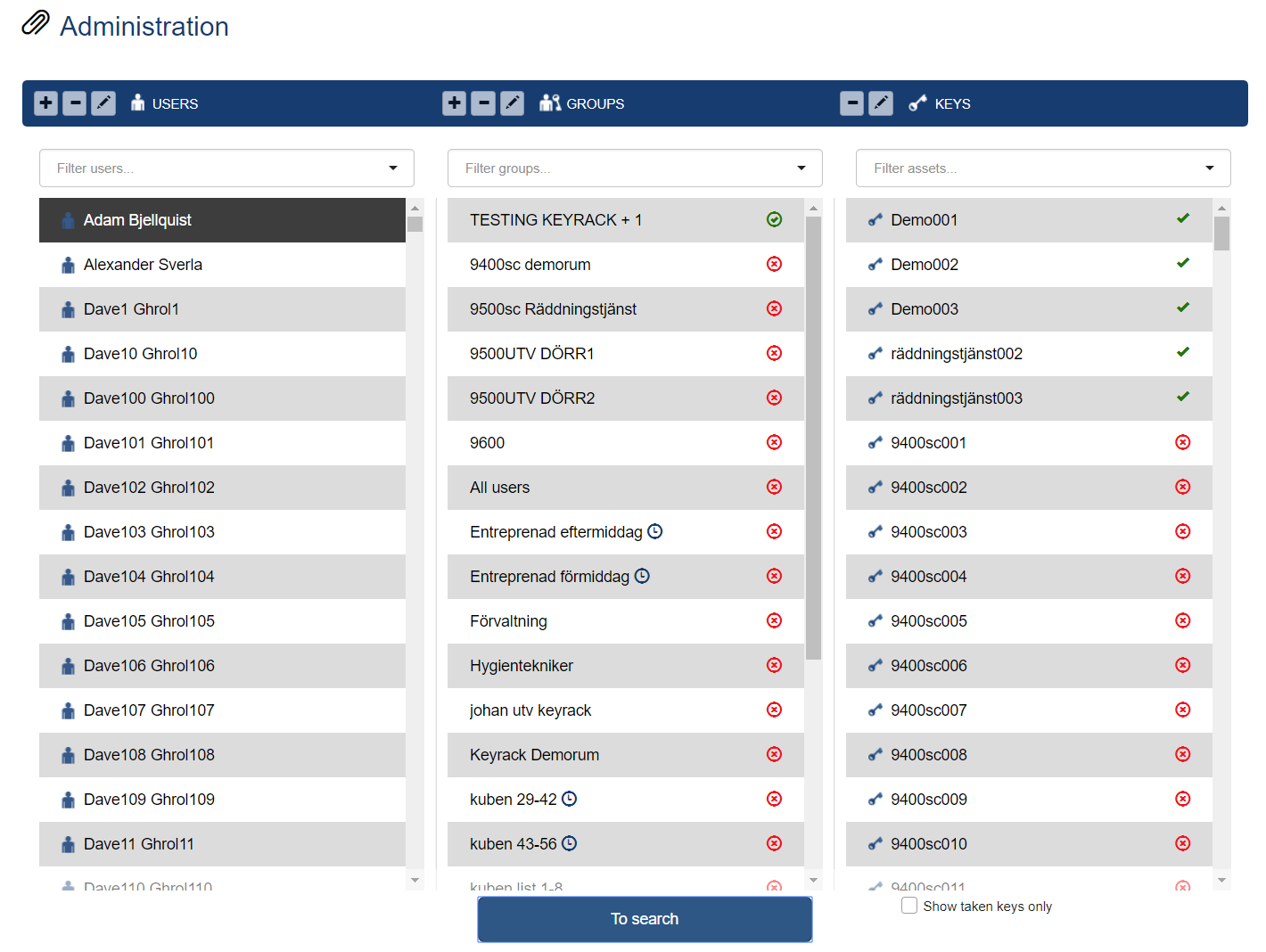
To connect a USERS or KEYS directly to each other, without any GROUP, do as following:
• Highlight the USER or KEY you like to use
• Click on TO CONNECT STATE
• Now you will see all users or keys in your system with  or
or  (In
the example connection is done from USER to KEY) A Checkbox without
circle indicates that the key has been connected via a group.
(In
the example connection is done from USER to KEY) A Checkbox without
circle indicates that the key has been connected via a group.
• Click on  and when it changes to the
  connection is complete.
• When you are done, click on TO SEARCH to return to search-view.
• For more or new connections, repeat procedure above.
Related Articles
Key Administration
After Logging in to KeyWin6 The Keys can´t be created from the portal. You need to login to the cabinet with the Superadmin PIN-code and insert each intellipin one by one. The key will then automatically appear in KeyWin6 key administration. The keys ...Adding KeyUser
After Logging in to KeyWin6 - To CREATE a new user press the + on the left side next to USERS on the ADMINISTATION page. The plus, minus and editing pen are re-occurring functions that you use for to add, delete or edit values all through the portal. ...